¶ Creating Subscriptions
Subscriptions are the products being sold on the AnalystHub platform. They represent the terms by which franchises get paid, and by which accounts receive notes (reports) via campaigns.
See also: Key Concepts.
Subscriptions can be created in two ways. The first way is by using the the menu in the upper-right part of the Subscriptions page:
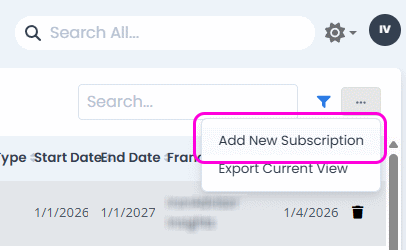
The other way to create subscriptions is through the Opportunities on-boarding flow.
Either way, the Subscription form will appear:
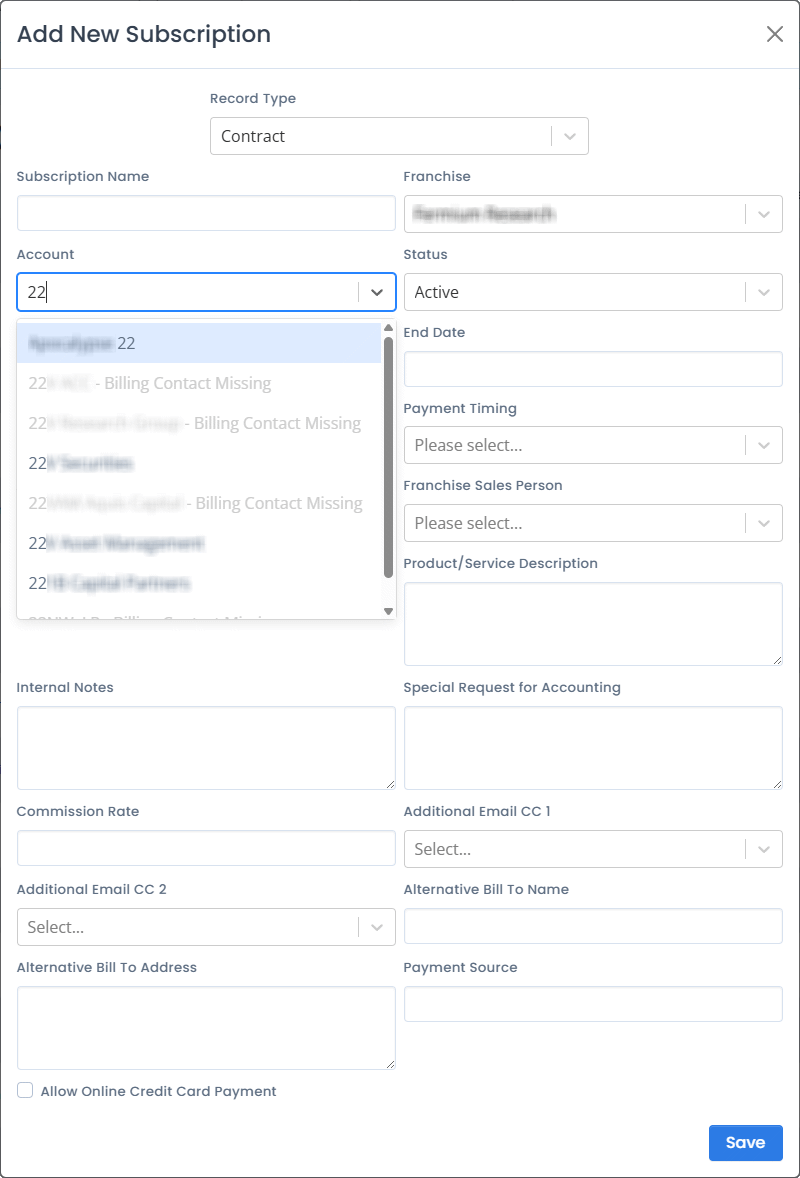
Field descriptions follow.
¶ Record Type
The Record type field mostly deals with how the payment for the subscription is handled. The choices are:
- Contract - Long-term contract with fixed pricing, classical service subscription.
- One time payment - One-time report.
- Trading revenue - Payment is a percentage of trading comissions allocated to the franchise.
- Variable payment - Similar to One time, but recurring.
- Vote - The client (i.e. account) company has a firm-wide vote to allocate their research spending based on internal scoring.
- Sponsorship - A client sponsors an event that the franchise is hosting.
- Consulting - Billable hours of a particular analyst on a particular topic / task.
The rest of the form fields change slightly, depending on this choice.
¶ Subscription Name
Arbitrary name assigned to the subscription, usually contains the name of the analyst / franchise and the name of the account.
¶ Franchise
The franchise name (related to the current user login).
¶ Account
This is an “autocomplete”-type entry field, and it will show a list of account names that contain the letters or numbers typed into the edit box.
¶ Status
- Active - Active subscription.
- Awaiting renewal - The subscription is past end-date, inactive until it’s renewed, but the renewal process has not begun yet.
- In progress - The renewal process is in progress, but not complete yet.
- Renewed - The subscription is closed, but there is a new one in its place.
- Renewal refused - The subscription has explicitly been dropped.
¶ Start Date, End Date
Subscription start and end dates.
¶ Payment Frequency
Only visible if the record type is Contract, Vote, or Consulting.
- Annual
- Semi-Annual
- Quarterly
- Monthly
- Pay in Full
¶ Payment Timing
Only visible if the record type is Contract, Vote, or Consulting.
- In Advance
- In Arrears
This influences invoice generation. Invoices are generated either before the period or after the period.
¶ Amount, Expected Amount
The price of the subscription or one-time payment, in case of Contract-based, One-time payment, Sponsorship, or Consulting record types, or the expected fee for the Trading Revenue or Variable payment record types.
¶ Franchise Sales Person
Person responsible for sales on the analyst side.
¶ Number of Hours, Consulting Analyst
Only visible if the Record Type is set to Consulting.
The analyst and the number of hours agreed upon for consulting services.
¶ User Team
Indicates that a smaller team within the client is the user of this subscription. This could indicate that an additional sub is possible for that account with a different team.
¶ Product/Service Description
Internal note about the product or service that is the consumer of the subscription.
¶ Internal Notes
A place to record user notes.
¶ Special Request for Accounting
Requests such as a preference for sending invoices on certain dates or a time of day.
¶ Additional Email CC 1, CC 2
Additional recipients for invoices.
¶ Alternative “Bill To” Name, Address
Alternative “Bill To” information.
¶ Payment Source
Internal note about payment source (such as a particular project budget).
¶ Allow Online Credit Card Payment
Is online credit card payment enabled (might incur additional fees).
90% done